
Download Plurana – Free SVG Design Tool for Graphic Designers
Overview
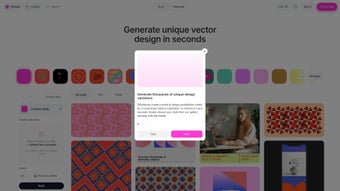
Plurana is a cloud‑native generative vector design platform that has quickly become a favorite among graphic designers, branding specialists, and social‑media creators who need high‑quality SVG assets without the overhead of traditional desktop editors. Built as a responsive web application, Plurana leverages algorithmic pattern generation to produce endless variations of motifs, textures, and decorative elements in a matter of seconds. What sets it apart from generic SVG generators is its deep respect for cultural heritage: the engine draws inspiration from folk art traditions across Asia, Africa, Europe, and the Americas, offering a curated library of motifs that carry authentic visual storytelling potential.
This cultural infusion means that every design generated by Plurana carries a unique personality, helping brands differentiate themselves in crowded visual markets.
One of the most compelling aspects of Plurana is its seamless two‑way integration with Figma. Users can push generated SVGs directly into a Figma file, preserving vector editability, or pull existing Figma components into Plurana to serve as seeds for further generative exploration.
This workflow eliminates the tedious export‑import loop that often slows down collaborative design projects.
Personalization is equally powerful. Designers can upload their own images, textures, or vector fragments, which the generative engine blends with its internal libraries to produce hybrid outcomes that reflect both the brand’s visual language and Plurana’s algorithmic creativity.
Because the platform runs entirely in the browser, there is no software to install, no updates to manage, and all projects are saved automatically to encrypted cloud storage. Whether you are a freelance illustrator seeking fresh inspiration, a marketing team needing a rapid set of patterned backgrounds, or an agency looking to accelerate concept development, Plurana delivers a secure, instantly accessible, and culturally enriched solution that fits into modern design pipelines.
Features, Compatibility & Pros‑Cons
- Generative Design Engine: Unlimited SVG variations created from algorithmic rules, saving hours during the ideation phase.
- Figma Two‑Way Sync: Export SVGs to Figma or import Figma components as seeds for generative workflows.
- Cultural Heritage Library: Over 500 motifs inspired by global folk art, giving designs authentic visual depth.
- User Media Upload: Supports images, textures, and vector fragments for custom hybrid creations.
- Real‑Time Preview: Instant in‑browser rendering of changes, allowing rapid iteration.
- Responsive Web App: Works on any modern browser—no OS‑specific installation required.
- Export Flexibility: Download SVG, copy code snippets, or push directly to a connected Figma file.
- Version History: Automatic saving of each iteration with easy revert and side‑by‑side comparison.
- Secure Cloud Storage: Encrypted servers protect intellectual property and ensure privacy.
- Free Tier & Paid Plans: Generous free plan for hobbyists; premium subscriptions unlock high‑resolution exports and exclusive motif collections.
As a web‑based service, Plurana runs on any operating system that supports a current browser—Windows 10/11, macOS Ventura and later, Linux distributions, as well as Android 9+ and iOS 13+ devices. Because all heavy processing occurs on Plurana’s servers, local hardware requirements are minimal, making the tool equally performant on low‑end laptops and high‑end workstations.
Pros
- Zero‑install, instantly accessible from any device.
- Generative engine dramatically reduces concept‑phase workload.
- Deep Figma integration streamlines collaboration with UI/UX teams.
- Rich cultural motif library adds unique visual identity.
- Secure cloud storage safeguards designs and intellectual property.
- Generous free tier suitable for freelancers and small studios.
- Real‑time preview accelerates iteration and reduces guesswork.
Cons
- Requires a stable internet connection; offline work is not supported.
- Advanced pattern collections are locked behind paid subscriptions.
- Algorithmic customization is limited to preset sliders, restricting fine‑grained control.
- Export formats are currently limited to SVG, PNG, and JPG; no native PDF export.
- Designers unfamiliar with generative concepts may experience a learning curve.
Overall Rating: 4.5/5 – Plurana delivers a fresh, culturally enriched approach to SVG creation that feels modern, intuitive, and highly productive for today’s design teams.
Installation & Usage Instructions
Getting Started – No Download Needed
Because Plurana lives entirely in the browser, the first step is simply to open a modern browser—Chrome, Edge, Firefox, or Safari—on any device and navigate to plurana.com. From there, click “Sign Up” to create a free account using an email address or Google sign‑in. After confirming your email, log in to access the dashboard where new projects are launched.
- Click “New Design” on the dashboard.
- Select a starting point: blank canvas, a cultural motif, or an uploaded image/vector.
- Use the right‑hand panel sliders to adjust complexity, color palette, symmetry, and randomness.
- Watch the real‑time preview update instantly as you tweak parameters.
- When satisfied, click “Export” and choose to download the SVG, copy the code, or push directly to a linked Figma file.
- Use the History panel to revert to previous iterations or compare variations side‑by‑side.
Best Practices for Efficient Workflow
Leverage the built‑in color palettes. Plurana includes pre‑curated palettes inspired by traditional dyes; selecting a palette that aligns with brand guidelines reduces the time spent on manual color adjustments.
Utilize batch export for social media. After generating a set of SVGs, the “Batch Export” button creates PNG or JPG files in common dimensions (1080 × 1080, 1200 × 628, etc.), streamlining the hand‑off to content teams.
Connect Figma early. Linking your Figma account before you start designing allows you to push updates directly into component libraries, keeping design systems synchronized without extra steps.
Keep assets organized. Name each project descriptively and use tags within Plurana’s library to group related designs. This habit makes it easier to locate assets later, especially when collaborating with multiple stakeholders.
Following these steps ensures that even newcomers to generative design can produce professional‑grade SVG assets quickly, securely, and without the overhead of installing heavyweight software.
FAQ & Conclusion
Is Plurana completely free to use?
Plurana offers a robust free tier that includes unlimited SVG generation, basic cultural motif libraries, and full Figma integration. Premium features—such as high‑resolution exports, exclusive heritage collections, and priority support—are available through affordable subscription plans.
Can I use Plurana on a mobile device?
Yes. The platform is fully responsive and works on modern browsers for Android and iOS. While the full set of sliders is best experienced on a desktop, you can still generate, preview, and export SVGs from a smartphone or tablet.
How does Plurana protect my uploaded media?
All uploads are encrypted in transit with TLS 1.3 and stored at rest using AES‑256 encryption. Files are automatically purged after 30 days of inactivity unless you choose to retain them in your project library.
Can I push designs directly into a Figma component library?
Absolutely. After linking your Figma account, you can send generated SVGs to any selected Figma file or component library with a single click, preserving full vector editability inside Figma.
Which browsers are officially supported?
Plurana is optimized for the latest versions of Chrome, Edge, Firefox, and Safari. Older browsers may experience slower preview rendering or missing UI features.
Conclusion & Call to Action
Plurana stands out as a modern, culturally rich SVG generator that bridges algorithmic creativity with practical design workflows. Its web‑first nature eliminates installation hurdles, while deep Figma integration and a generous free tier make it accessible to freelancers, agencies, and in‑house design teams alike. Although an internet connection is required and some advanced motif collections are gated behind paid plans, the overall value—instant generative suggestions, secure cloud storage, and authentic heritage‑inspired visuals—far outweighs these minor limitations for most professionals.
If you want to accelerate concept development, add authentic cultural flair to your brand assets, or simply explore a new way of creating vector graphics without bulky software, Plurana is ready for you. Start your free account today, generate your first pattern, and experience a fresh take on vector design.
Get Started with Plurana – Free Account


.png)



